Managing orders is important to ensure the status, date, planning location and operator settings have been configured correctly.


FAQ
Routing Column Missing on Load Production Order Screen
Issue
A user reports that the Routing column no longer appears on the Load Production Orders screen.
Cause
This column has been manually hidden through the screen’s display settings.
Tascus allows users to customise which columns are visible, so the Routing field may have been unticked accidentally.
Solution
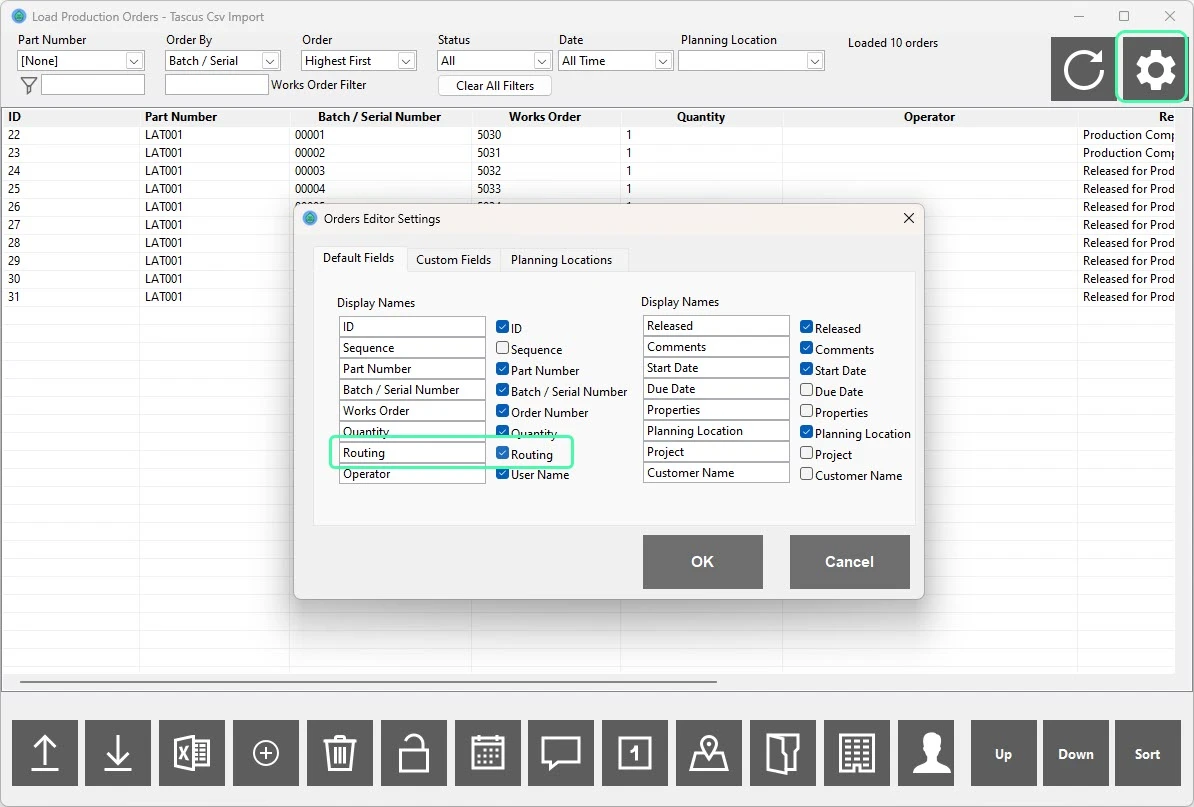
Open the Load Production Orders screen.
Click the Settings (⚙️) gear icon in the top-right corner of the page.
In the Orders Editor Settings window that appears, go to the Default Fields tab.
Locate Routing in the list on the left.
Ensure the Routing checkbox is ticked.
Click OK to save the layout.
The Routing column will now be visible again.