
Tascus stations can connect to physical inputs and outputs through an IO device, giving operators hardware controls and visual status indicators at the workstation. Push buttons let operators run a sequence without touching the screen — continue, abort, or step back — while a light stack shows production status across the station at a glance.
Both run through the same IO device and are set up in the same place: Settings > System IO. This article covers enabling inputs and outputs, the default push-button configuration, light stack setup, and the supported hardware.
What you'll need
A Tascus IO device at the station. There are two standard options:
Tascus I/O Kit — a Brainboxes remote IO module you connect and wire yourself (self-install).
Tascus Smart Bench — a pre-wired station built by JSK on the proven smart bench design.
Both connect to Tascus the same way and are configured using the steps below.
Station Push Buttons
Station push buttons replace some of the touchscreen interaction when running Tascus sequences, so operators can drive a sequence with physical buttons at the workstation.
The following table lists the configuration of the push buttons:
DI Function | Function |
|---|---|
Sequence Continue | Start sequence / Complete step / Next / Pass |
Sequence Abort | Abort sequence / Cancel / Fail |
Sequence Back | Back one step (when running a sequence) |
Step Functions | Used is certain step types |
To enable this functionality, all you need to do is check Inputs Enabled, then select which input is used for which button.
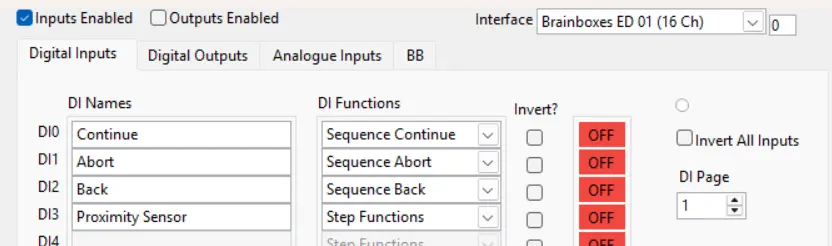
Physical wires for the push-buttons should be connected like this:

Light Stack
A 4-way light stack can be added to a Tascus station IO device, it will light up with the following status:
State | Light Status |
|---|---|
Non Production | All Off |
Production Running | Green |
Production Slow (behind standard time) | Amber |
Planned Downtime | Amber |
Unplanned Downtime | Red |
Configure this under Settings > System IO
Enable Outputs, then configure output channels to lights.
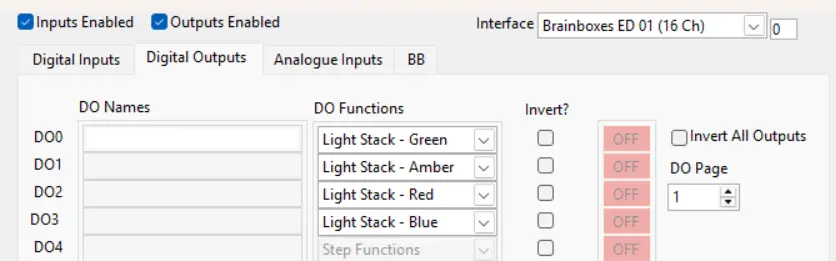
Brainboxes Schematics
Digital Inputs

Digital Outputs

