
Tascus can integrate with your ERP system so that production orders flow automatically from planning to the shop floor, and live execution data flows back the other way. This removes manual re-keying between systems, keeps both sides in step, and gives your ERP real-time visibility of what is happening on the floor.
This article explains how ERP integration works in general terms and applies to any ERP that exposes a suitable API.
In this article
Where Tascus fits
Your ERP is the system of record for planning: it holds the master data, schedules work, and owns the commercial picture. Tascus is the execution layer: it takes a planned order, guides operators through the work, and captures exactly what happened.
Integration connects the two so that:
- The shop floor always works to the latest plan from the ERP.
- The ERP always reflects real progress and results from the floor.
Master data stays owned by the ERP. Tascus consumes it rather than duplicating or editing it, so the ERP remains the single source of truth.
How it works
Tascus connects to your ERP through its standard API. Tascus data is held in SQL Server, so reporting and downstream systems can also read it through a normal SQL connection — there is nothing proprietary in the data layer.
The integration is set up once and then runs live. After the initial configuration, data flows automatically in both directions with no manual maintenance to keep the two systems synchronised.
Data flows between Tascus and your ERP
Integration is bi-directional. Tascus pulls planning data in, and pushes execution data back out.
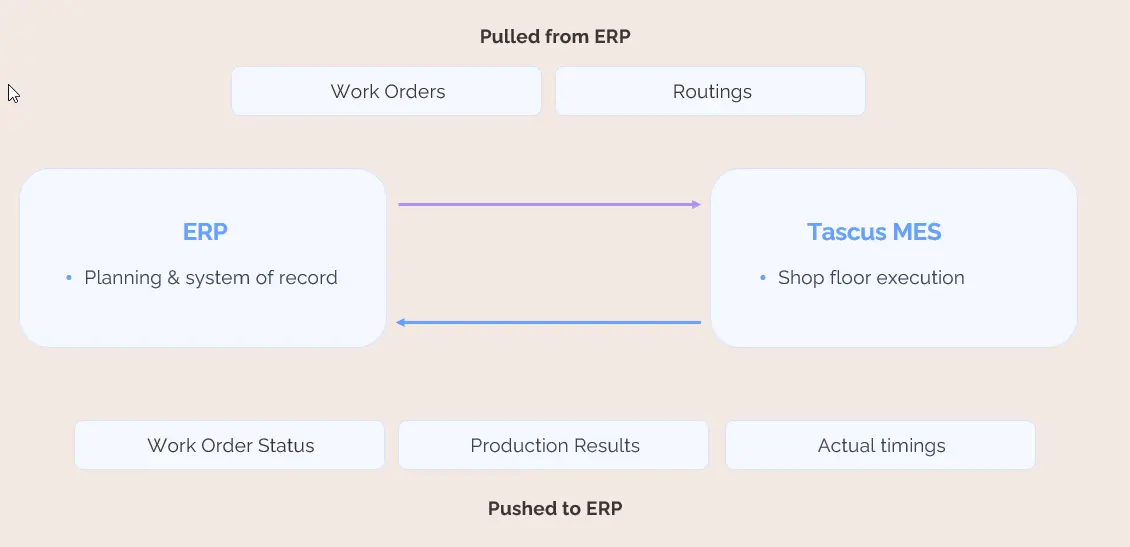
How data flows between your ERP and Tascus: works orders and routings are pulled from the ERP; work order status, production results and live timing are pushed back to the ERP.
Data Tascus pulls from your ERP
- Works orders — what to build, the quantity required, due dates, and the linked product or part number. A works order in the ERP becomes a job ready to run in Tascus.
- Routings — the sequence of operations for a product: which operations are required, in what order, and at which workstations. The routing tells Tascus how the work should be carried out.
Data Tascus pushes to your ERP
- Work order status — whether an order is not started, in progress, or complete, including progress at the individual operation level. The ERP sees the live state of the floor without anyone reporting it manually.
- Production results — quantities completed, pass/fail outcomes, scrap and rework, and traceability data such as serial or batch records captured during the build.
- Live timing — actual time taken per operation and per unit. This gives the ERP real progress in real time and lets you compare actual times against standard times.
Before you integrate: aligning master data
The single most important prerequisite is that key reference data matches across both systems. Both systems use these values to identify the same thing, so if they do not agree, Tascus cannot reliably link a works order to its routing or send results back to the right record.
The reference data that must align:
- Works order numbers / IDs — the key that ties everything together. Every status update, production result, and timing record Tascus pushes is matched back to its order in the ERP by this identifier.
- Part numbers — used to link a works order to the correct product and routing.
- Operation names and IDs — used to map each step in the routing to the right operation in both systems.
- Work centre / workstation identifiers — so routed operations land on the correct workstation in Tascus.
- Result and scrap / reason codes — so pass/fail, scrap, and rework results arrive in the ERP correctly coded rather than uncoded.
- Units of measure — so order quantities, completed counts, and scrap counts are reported consistently on both sides.
Getting this alignment right is a one-time design activity carried out during setup. The effort involved scales with the volume of data and how clean and consistent the existing data is. It is worth completing carefully, because solid master-data alignment is what makes the live sync dependable afterwards.
Sync behaviour
When data syncs
Once configured, data flows automatically — there are no scheduled re-syncs or manual exports to run.
Works orders are pulled into Tascus when they reach a released or ready state in the ERP, not while they are still in planning or draft. This keeps the shop floor list clean and ensures operators only see work that is genuinely ready to run. Execution data is pushed back as it is captured, so the ERP reflects progress in near real time.
Handling changes mid-flight
If an order is changed in the ERP after it has started in Tascus — for example a quantity change or a cancellation — Tascus surfaces the change rather than silently overwriting a job in progress. Work already recorded against the order is preserved, and a clear warning is raised so a supervisor can review and act on it. This protects traceability and avoids losing data that has already been captured on the floor.
If the connection is interrupted
If the ERP is temporarily unreachable, the shop floor keeps running. Operators continue working and recording results in Tascus as normal. Tascus buffers the data it needs to send and pushes it automatically once the connection is restored, so nothing is lost and no manual catch-up is required.
Warn, don't block
Across all of the above, Tascus follows a consistent principle: when it encounters a mismatch, a missing reference, or a connectivity issue, it surfaces a clear warning rather than halting work. Production is never blocked by an integration problem.
Security
The connection between Tascus and your ERP uses the ERP's standard, authenticated API. Access is granted using credentials issued by your ERP team and is scoped to only the data the integration needs. Traffic between the systems is encrypted in transit. Credentials are stored securely and are not exposed in the Tascus client. The exact authentication method depends on the ERP and is confirmed during setup.
What you need to integrate
- An ERP system that exposes an accessible API.
- API access and credentials provided by your ERP team or administrator.
- Agreed field mappings between the two systems — principally works order IDs, part numbers, and operations.
For standard data, integrating with Tascus does not require custom development inside your ERP. Where an ERP is heavily customised or uses non-standard fields, some configuration on the ERP side may be needed; this is identified during setup.
Scope and boundaries
- Tascus executes the plan; it does not replace ERP planning or scheduling.
- The ERP remains the master for product, part, and routing data. Tascus consumes this data and reports against it.
- Integration keeps the systems synchronised in real time. It is not a tool for editing ERP master data from the shop floor.
Setup process at a glance
1. Confirm your ERP exposes a suitable API and obtain access.
2. Align master data — works order IDs, part numbers, operations, work centres, and codes — across both systems.
3. Configure the connection and field mappings.
4. Validate the integration in a sandbox or test environment.
5. Switch to live operation.
