
You can send a notification email message automatically from a Tascus sequence using the Send Message step.
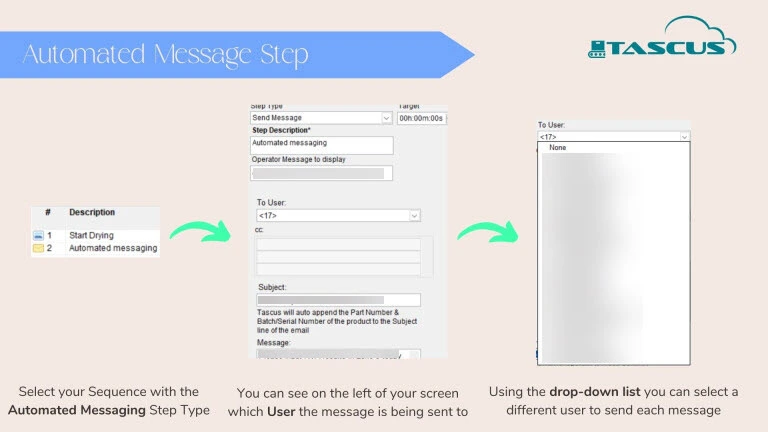
Either select a user to send a message or choose a specific email.


FAQ's
Emails Not Sending — "SSPI Failed" Authentication Error
Symptom
Tascus fails to send notification/label emails. An error dialog appears referencing:
System.Security.Authentication.AuthenticationException: A call to SSPI failedSystem.ComponentModel.Win32Exception: The function requested is not supported
This typically appears from Common.lvlib:Send Email (Text).vi.
Cause
This is a TLS version mismatch, not a credentials or server problem.
Tascus sends email using LabVIEW's .NET SmtpClient call. On many Windows machines, .NET Framework defaults to negotiating TLS 1.0/1.1. Most SMTP providers (including Dreamhost) now require TLS 1.2 or higher on port 587. When the negotiation fails, .NET reports it as this cryptic SSPI/Win32 error rather than a clear "unsupported TLS version" message.
You can confirm this is the cause by testing the same SMTP server/port/credentials manually via PowerShell (Send-MailMessage) — if that succeeds while Tascus fails, it confirms the issue is specific to how the LabVIEW/.NET process on that machine negotiates TLS, not the mail server itself.
Fix
Force the machine to use strong crypto (TLS 1.2) for all .NET Framework applications, via registry.
Run PowerShell as Administrator, then:
powershell
New-ItemProperty -Path "HKLM:\SOFTWARE\Microsoft\.NETFramework\v4.0.30319" -Name "SchUseStrongCrypto" -Value 1 -PropertyType DWord -Force

New-ItemProperty -Path "HKLM:\SOFTWARE\Wow6432Node\Microsoft\.NETFramework\v4.0.30319" -Name "SchUseStrongCrypto" -Value 1 -PropertyType DWord -Force
Then restart the machine (or at minimum fully close and reopen Tascus/LabVIEW) before retesting.
Steps
Confirm SMTP connectivity is not the issue:
Test-NetConnection -ComputerName <smtp host> -Port 587should returnTcpTestSucceeded : TrueConfirm credentials are valid by sending a manual test with
Send-MailMessageusing the same host/port/credentials Tascus usesIf the manual test succeeds but Tascus still fails with the SSPI error above, apply the two registry keys as Administrator
Restart the machine (or restart the Tascus/LabVIEW process at minimum)
Retry sending from Tascus and confirm the email arrives
Notes
This fix applies per-machine. If the notification service runs on a server rather than a workstation, the same registry change must be applied there.
If the error persists after the registry fix and reboot, escalate — this may indicate a deeper OS-level TLS/cipher suite restriction (e.g. via Group Policy) that needs IT involvement.
